March 15, 2026
Breaking Free: Using an External Design System in Drupal
If you've worked in Drupal long enough, you've probably built something that looks a lot like a design system — a collection of reusable components, shared styles, and naming conventions — all living inside your theme. Whether you organized them with Pattern Lab or more recently with Storybook, the components still lived in your theme. And for many projects, that works fine.
But there's a ceiling to that approach. When your components need to serve more than one site, more than one framework, or more than one team, a theme-bound system starts to show its limits. That's when it's worth considering a different architecture: a standalone design system that your Drupal theme consumes rather than contains.
I've been taking this approach for years — pulling an external design system into a Drupal theme rather than building one inside it. But what I've been experimenting with more recently is consuming a design system that isn't built specifically for Drupal, and using Single Directory Components (SDC) as the integration layer.
A quick primer on Single Directory Components
If you haven't used SDC yet, the concept is straightforward. Instead of scattering a component's template, styles, and metadata across multiple directories in your theme, everything lives together in one folder:
button/
  button.component.yml   # Metadata and prop definitions
  button.twig            # Template
  button.css             # Styles
  button.js              # JavaScript (optional)
The .component.yml file defines the component's props using JSON Schema, which makes the component self-documenting and compatible with tools like Drupal Canvas. SDC has been stable in Drupal core since Drupal 10.3, and it's the foundation for where component-driven Drupal theming is headed.
This is much closer to how modern design systems are structured in the frontend ecosystem, where a component's logic, styles, and documentation are co-located. It also makes it easier to wrap external components — like those from a design system — without having to re-architect your theme.
The architecture: your theme as a consumer
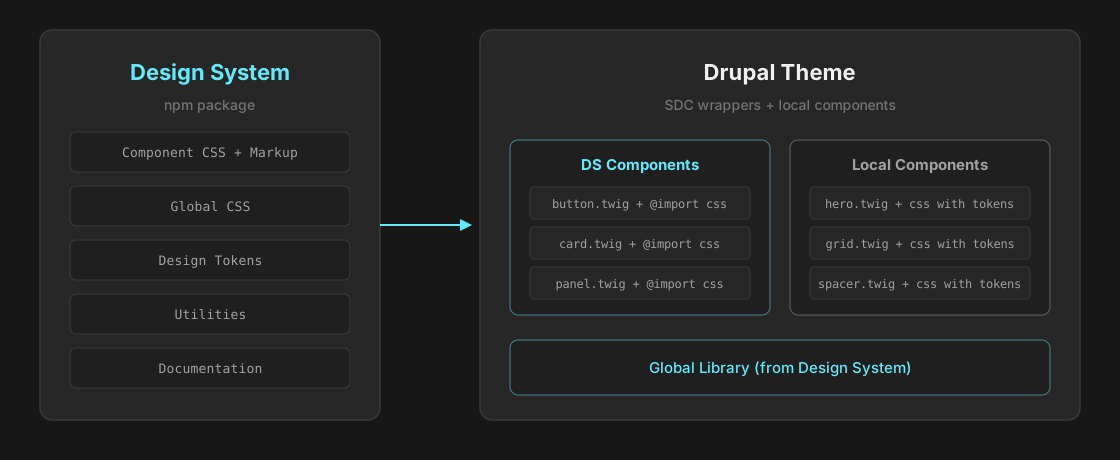
The key idea is simple: your design system is a package, and your Drupal theme installs it as a dependency. The theme's job is to wrap design system components for Drupal, not to recreate them.
In practice, this means your theme's package.json declares the design system as a dependency:
{
  "dependencies": {
    "@your-org/design-system": "^2.0.0"
  }
}
From there, two types of components emerge in your theme.
Type 1: Design system components
These are thin SDC wrappers around components that already exist in the design system. The Twig template applies the design system's CSS classes, and the stylesheet imports the component's CSS directly:
/* button.css */
@import '/path/to/design-system/css/component-css/button.css';
The template uses the design system's class conventions:
{# button.twig #}
{% if url is not empty %}
  <a href="{{ url }}" class="ds-button{{ variant_class }}{{ size_class }}">
    {{ label }}
  </a>
{% else %}
  <button class="ds-button{{ variant_class }}{{ size_class }}" type="button">
    {{ label }}
  </button>
{% endif %}
The component metadata in .component.yml maps the design system's API to Drupal's prop system — defining which variants, sizes, and options are available. The wrapper is lightweight, but it gives you full Drupal integration: content editors can configure the component through the UI, and the design system handles the visual output.
Type 2: Local components
Not everything needs to come from the design system. Site-specific components — like a hero section or a custom layout — can be built locally in your theme. The key is that they still use the design system's design tokens for spacing, color, typography, and other foundational values:
/* hero.css */
.hero {
  position: relative;
  overflow: hidden;
  color: var(--ds-color-fg-reverse);
  border-radius: var(--ds-spacing-m);
}

.hero__heading {
  font-size: var(--ds-typography-size-5xl);
  font-weight: var(--ds-typography-fw-semibold);
  line-height: 1.125;
}
These local components are fully custom, but they're visually consistent with the rest of the system because they're built on the same token foundation. If the design system updates its color palette or spacing scale, local components pick up those changes automatically.
A note about JavaScript
Not all components are purely CSS and markup. Some design system components include interactive behavior that needs to work within Drupal's JavaScript framework. When wrapping these, you'll want to add a .js file to your SDC that attaches the necessary Drupal behaviors — initializing the component on page load and handling Drupal's AJAX-driven DOM updates. The specifics will depend on your design system's JS architecture, but the key point is that SDC supports JavaScript out of the box, and your wrapper can bridge between the design system's interactivity and Drupal's behavior system.
What you gain from this architecture
There are real benefits to this separation, and they compound over time.
Your design system isn't locked to Drupal. The same system can power a React app, a static site, a Twig-based Drupal theme, or anything else that can consume CSS and tokens. This also means you don't need to maintain a separate Drupal-specific toolkit.
Updates flow in one direction. When the design system ships a new version, your theme updates its dependency. Component styles are upgraded without touching your Twig templates or prop definitions.
Teams can work independently. The design system team maintains components, tokens, and documentation. The Drupal team focuses on site-specific content modeling, page building, and integration.
New components are fast to build. With the right scaffolding, adding a new design system component to your theme takes minutes. We're also increasingly relying on AI to construct the Twig wrappers around the external components. Given the right documentation and context, AI can generate the Twig template, CSS import, and prop schema from the source component in seconds.
What about visual page builders?
This pattern works particularly well with tools like Drupal Canvas, where SDC components become drag-and-drop building blocks. The .component.yml schema defines what shows up in the editor sidebar, and content creators can compose pages without touching code.
But the architecture doesn't depend on Drupal Canvas or any specific page builder. SDC components work in standard Drupal templates, in Layout Builder, or anywhere else you'd use a Twig component. The page builder is a bonus, not a requirement.
Global CSS and design tokens
Beyond individual component styles, your design system likely provides global CSS — things like a reset, base typography, and the design token definitions themselves. These should be loaded as a global library in your theme, separate from any individual component.
In your theme's .libraries.yml, define a global library that pulls in the design system's core stylesheet:
global-styling:
  css:
    base:
      css/design-system-core.css: {}
      css/theme-global.css: {}
The core CSS file provides the design token custom properties (spacing, color, typography, etc.) that both your wrapped components and local components rely on. By loading it globally, every component on the page has access to the full token set without importing it individually.
The CSS question
One practical challenge is how to handle component CSS from an npm package in a Drupal theme. In local development, CSS @import statements pointing to node_modules/ work fine. But in production, you don't want to ship node_modules/ to your server.
My current solution is a build script that inlines those imports at deploy time — replacing each @import with the actual CSS content. The CI pipeline runs this before pushing the build artifact, so the deployed theme is self-contained with no runtime dependency on node_modules/.
I chose this simple approach intentionally — it's easy to understand and gets the concept working without introducing build complexity. But in theory, you could handle this however you want. Webpack, Vite, a PostCSS pipeline, a simple copy script — it doesn't matter as long as the component CSS gets to Drupal and stays in sync with the design system version you've declared as a dependency. The important thing is the architecture, not the specific build tool.
When is this approach right for you?
This isn't the right architecture for every project. If you're building a single site with a small team and no plans to reuse components elsewhere, a well-organized theme with solid conventions may be all you need.
But consider this approach when:
- Your organization already has a comprehensive design system and you want to bring it to Drupal
- Your components need to serve multiple sites or platforms
- You have (or plan to have) separate teams for design systems and site implementation
- You want to version and distribute your design decisions as a package
- You need your components to be framework-agnostic — usable in Drupal today and potentially elsewhere tomorrow
- You're investing in design tokens and want them to be the single source of truth across implementations
Looking ahead
This is an approach I'm actively exploring and iterating on. There are still open questions — around JavaScript integration, more complex component patterns, and how AI tooling can further streamline the wrapper creation process. I'll continue to share what I learn as this pattern evolves.
For now, I'd encourage you to look at your current theme and ask: is this a theme that happens to have reusable components, or is it a design system that happens to be trapped in a theme? The answer might point you toward your next architectural step.